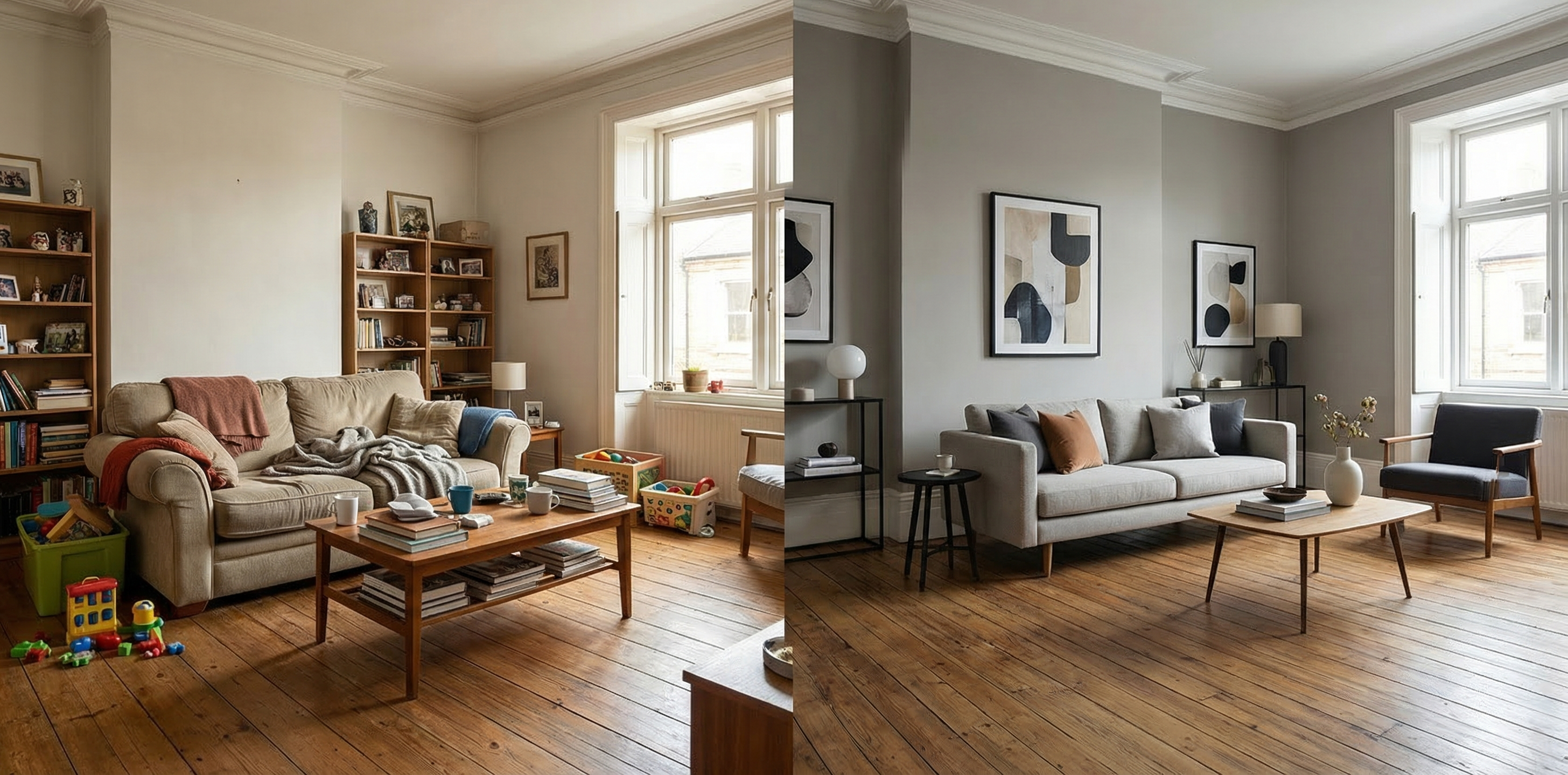
The staging conversation is always awkward. You’re sitting in your seller’s living room, surrounded by mismatched furniture, family photos on every surface, and a décor style that peaked around 2009 — and you need to explain why the listing photos aren’t going to show any of it. The old options were limited: ask the sellers to pack, rent staging furniture for thousands of dollars, or publish photos that give buyers exactly the wrong first impression. In 2026, there’s a fourth option — and it changes everything about how agents handle occupied listings.
AI virtual staging for occupied homes is not the same capability as staging an empty room. It goes further: analyzing existing photos, intelligently removing clutter, replacing furniture, modernizing finishes, and outputting listing-ready images that show the home’s true potential — all without your sellers moving a single piece of furniture. Here’s what every agent needs to know about deploying this capability in the current market.
The Occupied Home Problem Most Agents Don’t Fully Solve
Vacant homes are a straightforward staging challenge: empty rooms need furniture. But the majority of residential listings are occupied — and they present a far more complex presentation problem.
When a seller is living in the home, several friction points emerge simultaneously:
- Personalization — Family photos, children’s artwork, religious items, and personal collections make it difficult for buyers to imagine themselves in the space
- Clutter accumulation — Even well-organized sellers have more on surfaces, in corners, and visible in closets than listing photos can absorb gracefully
- Furniture scale mismatches — A sectional sofa purchased for a previous home, an oversized armoire, or a dining set that’s one chair too many can make rooms appear smaller than they are
- Dated style — Sellers who’ve lived in a home for 10+ years often have furnishings and finishes that reflect trends from a decade ago, creating a visual disconnect for buyers who skew toward contemporary aesthetics
- Staging resistance — Many sellers are reluctant to move, remove, or replace items in a home they’re still living in
Traditional staging addresses some of this — but requires physical access, significant cost, and seller cooperation on removal and storage. AI virtual staging for occupied homes addresses all of it digitally, in 24–48 hours, at a fraction of the cost.
What Buyers Are Actually Responding To Online
Before getting into the mechanics of occupied-home AI staging, it’s worth anchoring in what buyers actually need from listing photos.
According to the National Association of Realtors, 81% of buyers’ agents report that staging makes it easier for buyers to visualize a property as their future home. That number has been consistent across multiple survey cycles — and what it reveals is simple: buyers aren’t evaluating rooms, they’re evaluating lives. They want to see themselves in the space.
Personal items belonging to a seller actively interrupt that mental projection. When a buyer scrolling through photos sees a photo wall of someone else’s children, their brain unconsciously registers the home as occupied — belonging to someone else. When they see a dining table set for six in a room that can comfortably fit four, they mentally subtract space. When dated furniture fills every corner, they start estimating renovation costs.
The goal of any staging intervention — physical or digital — is to eliminate these mental friction points before buyers decide whether to schedule a showing. For occupied homes, AI virtual staging is increasingly the most practical tool available to get there.
How AI Virtual Staging Works for Occupied Properties
At a technical level, occupied-home AI staging involves more computational complexity than staging an empty room. The system isn’t just inserting furniture into white space — it’s analyzing depth, lighting, shadow, perspective, and material surfaces in a photo that already contains objects, then selectively removing or replacing those objects while maintaining photorealistic accuracy.
The most capable AI virtual staging platforms now offer distinct workflows for occupied properties:
Virtual decluttering removes surface-level items — countertop appliances, personal photographs, decorative objects, children’s toys, stacks of mail — while preserving the underlying surfaces and architecture. The output is a “cleaned” version of the photo that maintains the existing furniture layout but eliminates visual noise.
Furniture replacement goes further, removing existing furniture entirely and replacing it with staged pieces in a selected style — modern, transitional, farmhouse, minimalist, coastal — while matching the room’s lighting and perspective. This is the most powerful capability for sellers whose furnishings don’t align with their target buyer demographic.
Style modernization addresses specific finish elements: digitally updating an oak-cabinet kitchen to appear as though it has white or navy cabinetry, replacing a dated light fixture in a rendered version of the photo, or adjusting wall color to contemporary neutrals. Not every platform offers this depth of editing, but the leading ones do.
Virtual Decluttering: The Quick Win for Most Occupied Listings
For agents who haven’t yet integrated AI staging into their occupied-home workflow, virtual decluttering is the lowest-friction entry point — and often delivers the most immediate visual impact.
A standard occupied home listing session with a professional photographer produces photos that technically capture the space accurately. But accurate isn’t the same as appealing. In the kitchen, the countertops are covered with a coffee maker, a toaster, a knife block, fruit bowls, and three months of collected mail. In the primary bedroom, two nightstands host reading glasses, water bottles, charging cables, and books. In the living room, a blanket is draped over the couch and the TV remote is on the coffee table.
None of this is unusual. All of it distracts buyers from evaluating the actual room.
Virtual decluttering removes these items in post-processing. The photographer can shoot the home as-is, without requiring the seller to spend hours cleaning and clearing — and the AI removes the clutter digitally. The resulting photos show surfaces, floors, and furniture clearly without the lived-in visual noise that makes buyers discount their offer price or skip the showing entirely.
For occupied listings, this alone represents a meaningful upgrade. Sellers don’t need to do anything differently before the shoot. You get better photos. Everyone wins.
When to Deploy Full AI Staging (Not Just Decluttering)
Virtual decluttering improves occupied listing photos. Full AI virtual staging — including furniture replacement and style modernization — transforms them.
The cases where full staging makes the most business sense:
Dated furniture in a buyer’s market. When inventory is competitive and buyers have options, listings with 1990s oak bedroom furniture or floral sofas simply don’t perform as well online. Full AI staging replaces the furniture entirely in the listing photos, presenting a contemporary version of the room that connects with the target buyer demographic.
Mismatched style for the neighborhood. A bohemian home in a neighborhood that’s selling to young professional families, or a minimal, sparse setup in a high-end market where buyers expect luxury feel — these mismatches hurt performance. AI staging can align the visual presentation with the buyer profile without asking sellers to change anything about how they live.
High-price-point listings where presentation is paramount. At the upper end of your market, buyers have higher visual expectations. They’ve been through more homes, they’re more attuned to design quality, and they make faster judgments about whether a property is worth touring. Using RealEstage.ai to produce gallery-quality staging for high-value occupied listings is a defensible marketing investment — both for your seller and for differentiating your listing presentation.
Seller motivation to sell fast. When your seller needs to move quickly — job relocation, divorce, estate sale, bridge loan expiration — every day on market costs real money. Full AI staging compresses the timeline from great-photos-planned to great-photos-live to 24–48 hours, without requiring physical staging logistics that can take a week or more to coordinate.
Room-by-Room: Where AI Staging Delivers the Most Impact in Occupied Homes
Not every room benefits equally from AI-enhanced staging. Here’s where to focus effort in a typical occupied listing:
Living room. The lead photo for most listings. Furniture scale, style, and arrangement all determine whether buyers lean in or scroll past. Full AI staging in the living room almost always pays for itself in increased showing requests.
Primary bedroom. Second most-viewed photo in most MLS searches. Personal items, bedding, and furniture clutter are extremely common here. Both decluttering and full staging deliver strong visual uplift.
Kitchen. Virtual decluttering on countertops makes a significant difference. For dated cabinets, style modernization tools can present an updated finish without any physical renovation — a compelling conversation to have with sellers who’ve been reluctant to upgrade before listing.
Dining room. Oversized furniture is the most common issue. AI staging can replace a 10-person dining set with an appropriately scaled four-person table, making the room feel larger and more versatile. Leading AI real estate staging tools let you preview multiple furniture configurations before selecting the final staged image.
Home office or flex space. As remote work has remained normalized, buyers scrutinize home office setups more than they did five years ago. A cluttered or undersized office setup can be AI-staged to show a clean, functional workspace.
The Seller Conversation: Framing AI Staging Without Criticism
Recommending AI staging for an occupied home requires some finesse. You’re essentially telling a seller that their home’s existing presentation isn’t optimized for buyers — without making them feel judged for how they live.
The framing that works: this is about buyer psychology, not seller quality.
“Buyers who are scrolling through dozens of listings make split-second decisions. What we want to do is give them the cleanest, most appealing version of your home in those first images — so they add you to the showing list before they make any judgments. The AI staging lets us present that version of the home without you needing to do anything before the photographer arrives.”
This positions the tool as a service you’re providing — one that removes burden from the seller rather than adding it. Most sellers respond well to anything that makes the process easier while improving their outcome.
For sellers who push back on the idea that their home needs “digital alteration,” anchor in the data: virtual staging consistently improves online engagement and shortens days on market across property types and price points. You’re not fixing something broken — you’re optimizing the presentation for the platform where most buyers begin their search.
Building Occupied-Home AI Staging Into Your Listing System
The agents who extract the most value from AI virtual staging aren’t using it as an occasional add-on. They’ve built it into their standard listing workflow — for occupied homes and vacant ones alike.
A practical workflow for occupied listings:
- At the listing appointment: present sample before-and-after images from similar occupied properties. Let the seller see the difference. Most sellers become advocates once they see the output.
- Before the photo shoot: brief the photographer on which rooms will receive AI staging treatment, so they shoot with appropriate angles and lighting for the post-processing workflow.
- After the shoot: upload selected photos to your AI-powered real estate staging platform and select the appropriate service — decluttering, full staging, or style modernization — by room.
- Review and approve: most platforms return finished images within 24 hours. Review for realism before sending to the MLS.
- In your marketing package: use staged images for the MLS listing, your website, social media, and print materials. Include disclosure language where your MLS requires it for virtually staged images.
This workflow adds approximately two days to the pre-listing timeline — and it’s two days well spent.
The Competitive Argument: Your Sellers Are Comparing You to Other Agents
Here’s the real business case for integrating AI staging into your occupied-home listing approach.
Sellers interview agents. During those conversations, they’re evaluating your marketing plan as much as your commission rate. Agents who walk into listing appointments with sample AI-staged photos of occupied homes — showing before-and-after transformations in a style that matches the seller’s property — are presenting a tangibly superior service to agents who describe their “professional photography” without showing how those photos will actually perform.
Every listing you present without addressing the occupied-home visual challenge is an opportunity for a competitor who has solved it to win the business instead.
AI virtual staging for occupied properties has crossed from competitive differentiator to table stakes in high-activity markets. In 2026, the sellers who are most informed about the current market — the ones doing research, reading property marketing guides, asking sharp questions at listing appointments — increasingly expect agents to have a strategy for this. The agents who deliver that strategy clearly and confidently are winning more listings.
The tools to do it at scale, with professional output and fast turnaround, are available now. The barrier to integrating them into your practice is lower than it’s ever been.
Related Articles
- The Hidden Cost of Vacant Home Listings — And How AI Virtual Staging Eliminates It
- The Real ROI of AI Virtual Staging: A Data-Driven Guide for Listing Agents in 2026
- AI Virtual Staging Styles Guide: Matching Design Aesthetics to Your Buyers in 2026
- The AI Property Presentation Playbook: A Complete Listing System for 2026
- AI Virtual Staging vs. Price Reduction: Which Strategy Wins in 2026?
- The Complete AI Listing System: Virtual Staging, Copy, and Showings in 2026